24/7 Support Center
+1 952-292-1902

If you’ve ever wondered what is G Code in CNC?, you’re not alone. CNC (Computer Numerical Control) machines are the backbone of modern manufacturing, from hobbyist 3D printers to industrial milling machines. And at the heart of every CNC machine is G-Code – the programming language that tells the machine exactly how to move, cut, and shape materials.
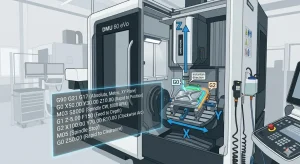 Understanding G-Code is essential whether you’re a hobbyist, a student learning CNC machining, or a professional operator looking to optimize your workflow. This complete beginner’s guide will explain G-Code in simple, clear terms, provide practical examples, and give you tips to start programming your CNC machine confidently.
By the end of this guide, you’ll not only know what is G Code in CNC, but you’ll also understand how to write basic programs, avoid common mistakes, and access resources to advance your skills.
G-Code is the programming language used by CNC machines to perform precise operations. Every movement, speed adjustment, and cutting action in a CNC machine is controlled through G-Code commands. Think of it as a set of instructions that guides the machine’s behavior.
In simpler terms, if CNC machining were like baking a cake, G-Code would be the recipe. It tells the machine what steps to follow, in what order, and at what speed to create the final product. Without G-Code, a CNC machine would have no idea how to perform even the simplest task.
G-Code commands can be broadly categorized as:
Each command has a specific syntax and function. Beginners can start with basic G and M codes and gradually learn more advanced commands as they gain experience.
Example:
These simple examples illustrate how G-Code communicates directly with the machine to produce precise actions.
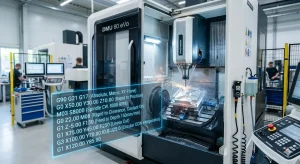 Understanding what is G Code in CNC also means understanding its origin. G-Code has been around since the 1950s when early CNC machines were developed. The language was standardized as RS-274D to ensure consistency across machines. Later, international standards like ISO 6983 helped modern CNC machines adopt G-Code globally.
In the early days, programmers manually wrote G-Code line by line, which was time-consuming and prone to errors. Today, CAD/CAM software can automatically generate G-Code from designs, but knowing the language is still crucial for troubleshooting, optimizing, and customizing machine operations.
So, how exactly does G-Code work in CNC machines? Let’s break it down:
CNC machines operate in a three-dimensional space using X, Y, and Z axes. G-Code tells the machine exactly where to move its tool along these axes.
G-Code commands control how the tool moves:
The spindle is the cutting tool. M codes control its behavior:
G-Code also defines the feed rate (movement speed of the tool) and spindle speed (rotation speed), ensuring precision and avoiding tool damage.
By following these instructions, CNC machines can perform highly precise tasks, from drilling holes to cutting complex 3D shapes. Mastering the basics of machine movement, spindle control, and feed rates is essential for any beginner.
Here’s a list of the most commonly used commands for beginners:
Command | Function | Example |
G0 | Rapid move | G0 X10 Y10 |
G1 | Linear feed | G1 X20 Y20 F100 |
G2 | Clockwise arc | G2 X30 Y30 I5 J5 |
G3 | Counterclockwise arc | G3 X40 Y40 I5 J5 |
M03 | Spindle on clockwise | M03 S500 |
M05 | Spindle off | M05 |
G90 | Absolute positioning | G90 |
G91 | Incremental positioning | G91 |
These commands form the foundation for every CNC program. Beginners should focus on mastering these before exploring advanced codes.
Let’s create a simple program to move a CNC mill in a square pattern:
Tips for beginners:
Example: Moving too fast without the correct feed rate may break the tool or damage material. Always double-check your program before execution.
Once comfortable with basic commands, beginners can explore:
These advanced practices help optimize efficiency and precision, making your CNC projects faster and more accurate.
Now you know what is G Code in CNC and why it’s crucial for CNC machining. With practice, you can write, read, and understand G-Code programs, opening the door to creating precise, high-quality parts. Start small, test on simulators, and gradually advance to complex projects. Mastering G-Code will unlock the full potential of CNC machining for hobby projects, prototyping, or professional manufacturing.
DEMENTOGEL Game Online x What Is G Code In Cnc
DEMENTOGEL Game Online x What Is G Code In Cnc menyajikan pengantar informatif tanpa berputar-putar. Di halaman ini, DEMENTOGEL dibahas sebagai identitas utama yang muncul bersama topik What Is G Code In Cnc. Penyajian tersebut membantu pembaca mengenali unsur judul dan tujuan informasi sebelum menilai isi lebih jauh.
Fokus pembahasan diarahkan pada konsistensi antara bagian pembuka dan penutup. Istilah Game Online dan tema What Is G Code In Cnc ditempatkan dalam konteks yang jelas, bukan dianggap sebagai bukti adanya hubungan bisnis atau layanan resmi. Pembaca tetap dapat menilai mana informasi yang relevan dan mana yang memerlukan pemeriksaan lanjutan.
Jika Anda ingin memahami bagaimana DEMENTOGEL disajikan dalam konteks www.mycncline.com, periksa kembali rincian halaman dan sumber informasi yang tersedia. Dengan begitu, Anda dapat membaca ringkasannya secara lebih terukur dan mengambil kesimpulan berdasarkan informasi yang benar-benar ada.